Printed or Digital Menus: Choosing What Works at the Table
Printed or digital menus can make ordering easier. Compare readability, shared browsing, updates, and access to choose a format that fits your dining room.
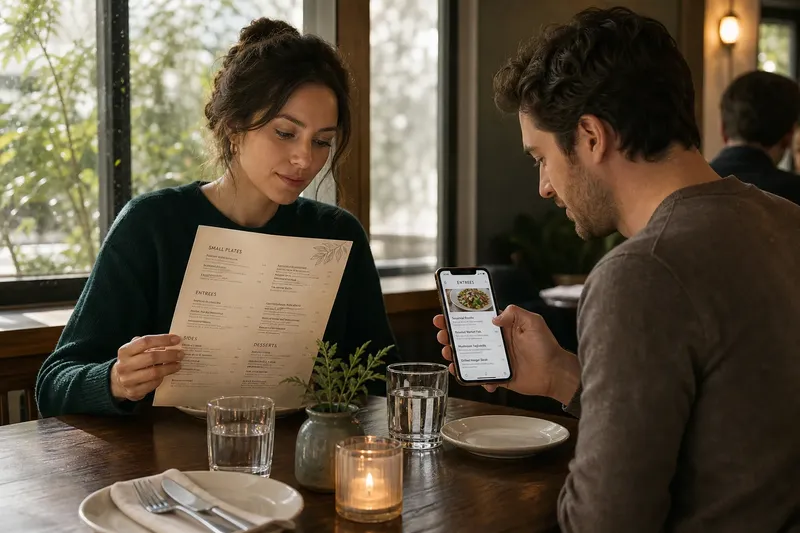
A diner at a window table tilts a printed menu to catch the light, while a companion opens the restaurant’s menu on a phone. Printed or digital menus can lead to the same meal, but they ask guests to browse in different ways—and give restaurant staff different upkeep to manage.
What does a printed menu make easier?
A printed menu puts several choices in view at once. Guests can compare a side dish with an entree, return to a description, or pass the page to someone across the table without changing screens.
That shared view can suit a group deciding what to order together. Like spreading a few recipe cards on a counter, it lets people compare options side by side rather than remembering what appeared on a previous screen.
Paper has limits: space is fixed, and a new dish or changed ingredient may call for an insert or replacement page. If the menu carries long descriptions, translations, and dietary notes, the layout can become crowded unless the restaurant edits carefully.
What can a digital menu do differently?
A digital menu can organize dishes into sections, show more detail on request, and include photographs. It can also keep current offerings in one place when the restaurant needs to revise a special or mark a dish unavailable.
A small phone screen may show only a few items at a time, though, making comparison less immediate. Guests may have to scroll back and forth, and images should complement—not substitute for—clear descriptions of ingredients and preparation.
Access matters as much as the menu itself. A guest may not have a suitable phone, may prefer not to use one at dinner, or may find a screen difficult to read; staff should be able to offer a printed or shared-screen alternative.
How should you compare the formats?
Before choosing, consider the conditions in the dining room rather than treating either format as a universal answer. Use this checklist to connect each observation to a practical decision:
- Lighting: Check whether overhead lights or window glare make the printed page hard to read; if glare obscures the text, adjust the lighting or provide a screen option, and if the screen reflects light, offer paper instead.
- Type and contrast: Check whether headings and dish descriptions are legible at a comfortable reading distance; if the print is cramped, redesign it or provide an enlarged digital view, and if the screen text is hard to enlarge, keep a clearer paper copy available.
- Table space: Check whether menus crowd plates, glasses, or serving dishes; if paper takes up needed space, make a digital version available, and if phones would be awkward to hold or prop up, use a compact printed menu.
- Language and detail: Check whether guests need translated descriptions or ingredient notes; if the paper layout cannot hold them clearly, use a digital version with organized sections, and if digital access is inconvenient, prepare a printed version with the essential information.
- Group ordering: Check whether diners tend to compare dishes aloud and share plates; if they need a common view, provide a paper menu or a screen that can be shared, and if guests prefer to browse privately, make individual digital access available.
- Menu changes: Check how often dishes or availability change; if updates are frequent, use a digital menu or a clearly dated insert, and if the menu is stable, a printed copy may be simpler to maintain.
- Staff access: Check whether every guest can view the choices without relying on a personal phone; if not, keep printed copies or a restaurant-owned screen available, and if guests can access the digital menu comfortably, still retain a backup for outages or device difficulties.
Say a restaurant has a small dining room with reflective windows, a menu that changes for seasonal dishes, and several tables that order shared plates. The manager notes that the window glare makes paper difficult to read at two seats, while one phone link would leave the group comparing separate screens.
The manager chooses a short printed menu for shared browsing and adds a digital version for expanded ingredient notes and seasonal updates. Staff use the printed copy when guests want to compare together, offer the digital details when more information is useful, and point out any unavailable dish before the order is placed; the tradeoff is maintaining two versions that must stay aligned.
How does each format affect reading together?
A printed menu gives a table a common reference. One guest can point to a small plate while another checks the description, making it easier to build a shared order without passing a phone around.
Digital browsing often happens on individual devices. That can give each diner control over pace and text size, but the group may need to say dish names aloud or share a screen to compare choices. Staff can help by using the same clear names on the menu and in conversation.
What should restaurants keep consistent?
Whichever format they use, restaurants should keep dish names, section order, and descriptions consistent. If a printed menu says “roasted squash” while the digital version uses a different name, guests and staff may hesitate over whether they refer to the same dish.
For paper, remove outdated inserts and worn copies when details change. For a digital menu, check that the link opens easily, sections remain orderly, and unavailable items are clearly marked before guests make a choice.
Which menu format suits your table?
Is a printed menu easier to compare?
It can be, because diners can see neighboring dishes and share the same page. Small type, glare, or crowded layout can make that advantage disappear.
Can guests use a digital menu without a phone?
Only if the restaurant provides another way to view it, such as a shared screen or printed copy. Staff should know which alternative is available and offer it without making the guest ask repeatedly.
Should a menu include food photographs?
Photographs can help guests picture a dish, but they cannot explain ingredients or preparation on their own. Pair images with concise descriptions so diners can compare more than appearance.
Can a restaurant offer both formats?
Yes, if the two versions agree on names, descriptions, and current availability. A combined approach can support shared browsing and detailed updates, but it requires someone to keep both versions in sync.
How can printed or digital menus fit the meal?
Choose the format that works with the room’s light, tables, menu changes, and the way guests order. Printed or digital menus are useful when they help diners reach a choice without adding avoidable friction; for some restaurants, offering both is the clearest answer, provided the information matches.